URGENT MEDICAL DEVICE CORRECTION
MiniMed™ 780G Insulin Pump 6.62 Software Update
| Product Impact | Model/CFN Number |
| MiniMed™ 780G Insulin Pump | MMT-1884 (Software Version 6.60 & 6.61) |
Update: February 2026
Dear Valued Customer,
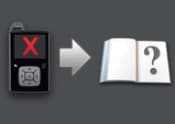
You are receiving this notification because our records indicate you may be using a MiniMed™ 780G insulin pump with software version 6.60 or 6.61, which could cause, (1) a pump error indicating that insulin delivery is being stopped (Pump error 53) or, (2) your pump may not respond correctly to a manually entered blood glucose (BG) check if the sensor glucose (SG) value is beyond limits, and (3) a critical pump error (Open Book Image) after the 6.62 version software update appears to have been successful.
This notification provides important information and actions for you to take.
Issue Description:
(1) Pump Error 53:
For pumps with software version 6.60 or 6.61: An issue may cause the pump to display Pump error 53, indicating insulin delivery is being stopped. This error occurs when the 780G pump software detects and mitigates an unexpected software condition. When this error occurs, insulin delivery is stopped, including all programmed boluses, and the pump is required to restart. If the pump alarm is not acknowledged within 10 minutes, the pump will vibrate and sound a siren at maximum volume. After clearing the pump alarm, the pump will reset, and insulin delivery will remain suspended. All on-screen prompts for Reservoir & Set must be followed to resume insulin delivery.
Note: Supplies needed to resolve Pump Error 53 are covered in the 780G System User Guide, Safety and Indications (a spare reservoir and/or infusion set).
(2) Blood Glucose (BG) Check Functionality:
For pumps with software version 6.60 or 6.61: When an Instinct sensor is used, the system may, at times, request the user to enter a manual BG to check the system's performance. However, due to a software anomaly, this verification may not occur as expected when the SG reading is above 400 mg/dL or below 50 mg/dL. In this case, SmartGuard will continue to deliver insulin based on the SG value or exit to manual mode. If this situation occurs, place the pump into manual mode, and use your BG meter for treatment decisions until you are able to complete the pump software update to version 6.62 listed in the “Actions Required” below.
(3) Critical Pump Error (Open Book Image):
If you are actively wearing the Instinct sensor during the pump software update from version 6.60/6.61 to version 6.62: The update completes however a pump safety check may later trigger the Critical Pump Error (Open Book Image), which stops insulin delivery, including all programmed boluses, and the pump can no longer be used. The Critical Pump Error (Open Book Image) is accompanied by a persistent siren that cannot be cleared/dismissed. If a Critical Pump Error (Open Book Image) occurs, please follow the action listed in the “Actions Required” below.
Risk to Health:
(1) Pump Error 53:
If on-screen prompts on the pump are not addressed as detailed above, insulin delivery will not resume, which may lead to delayed therapy and an increased risk of hyperglycemia or diabetic ketoacidosis (DKA). As of 05-Feb-2026, one hundred and nineteen (119) complaints have been received related to the Pump error 53 issue; however, no serious adverse events have been reported.
(2) BG Check Functionality:
When the BG check is not performed, the pump continues to display the SG value and uses the SG value for SmartGuard insulin delivery, which may lead to insulin over- or under delivery and an increased risk of hypoglycemia and/or hyperglycemia, or the pump may exit to manual mode. As of 05-Feb-2026, there have been no complaints received related to the BG check issue.
(3) Critical Pump Error (Open Book Image):
If a Critical Pump Error (Open Book Image) is not addressed in a timely manner through blood glucose level check, and continuing therapy using an alternate method of insulin delivery while the pump is removed, there is a potential for hyperglycemia or diabetic ketoacidosis (DKA) to occur due to the underdelivery of insulin. As of 05-Feb-2026, one hundred and forty-one (141) complaints have been received related to the Critical Pump Error (Open Book Image), out of which one (1) major severity harm was reported, and the causality relationship to the Critical Pump Error (Open Book Image) issue could not be confirmed. This risk is only applicable to patients who had an Instinct sensor paired while they were updating their pump from software version 6.60/6.61 to version 6.62.
Note: For instructions on how to find your pump software version, Click Here.
| ACTIONS REQUIRED | |
|---|---|
| If you are using Pump Software Version 6.60 or 6.61: | If you have already updated your Pump Software Version to 6.62: |
Please note that the pump software update process to version 6.62 is the same as the one that you performed to update your pump software version (6.60 and/or 6.61) and may take up to 3 hours to complete. |
If you experience Critical Pump Error (Open Book), or have any other questions, please contact 24-Hour Technical Support Team at 1-800-646-4633, option 1. Consult your healthcare professional to determine an alternate method of insulin delivery while the pump is removed. |
Please acknowledge that you have read and understood this notification and have followed the required actions listed by visiting: https://info.medtronicdiabetes.com/FA1544-B
Adverse reactions or quality problems experienced with the use of this product may be reported to the FDA's MedWatch Adverse Event Reporting program either online, by regular mail, or by fax.
Complete and submit the report online: www.fda.gov/MedWatch/report.htm.
- Regular mail or fax: Download the form at www.fda.gov/MedWatch/getforms.htm or call 1-800-332-1088 to request a reporting form, then complete and return to the address on the pre-addressed form or submit by fax to 1-800-FDA-0178.
As always, we’re here to support you and remain committed to delivering the highest quality products. If you have further questions or need assistance, please call the Medtronic 24-Hour Technical Support line at 1-800-646-4633, option 1.
Thank you for your understanding and continued trust in Medtronic Diabetes MiniMed™.
Sincerely,
Julio Salwen
Vice President, Quality
Medtronic Diabetes
Joshua Miller, MD, MPH
Sr. Medical Director, Medical Safety
Medtronic Diabetes