SmartGuard™ technology
Device: MiniMed™ 780G insulin pump
Pump software version: 6.21, 6.42, and 6.61 (Find software version)
How SmartGuard™ technology works
SmartGuard™ technology automatically adjusts insulin delivery, every 5 minutes, based on your sensor glucose readings. It helps keep your glucose levels within the target glucose range more often by delivering more insulin when your glucose starts to rise and less - or sometimes no insulin - when your glucose begins to fall.
Understanding modes of delivery
Your pump has two modes of insulin delivery: Manual Mode and SmartGuard™ technology. When you are in Manual Mode, the pump delivers insulin using your programmed basal and bolus settings. When you enter SmartGuard™, it does not use your manual mode basal rates. Instead, it uses your sensor glucose readings to adjust your basal insulin delivery every 5 minutes and deliver automatic correction boluses as needed. It still uses your insulin-to-carb ratios, active insulin time, and your selected SmartGuard target (100, 110, 120 mg/dL)
SmartGuard™ technology home screen
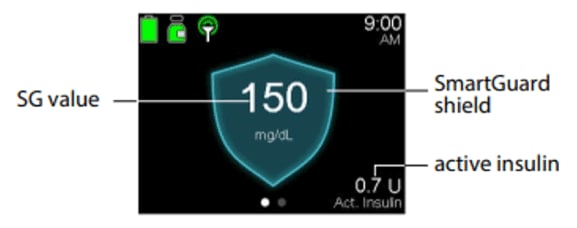
When SmartGuard technology is active, you'll see the SmartGuard shield on your pump's Home screen. The number in the middle of the blue shield shows your sensor glucose (SG). In the bottom right corner of the home screen, you can see your active insulin. Active insulin shows how much insulin is still working in your body from any past boluses you delivered.
Auto basal
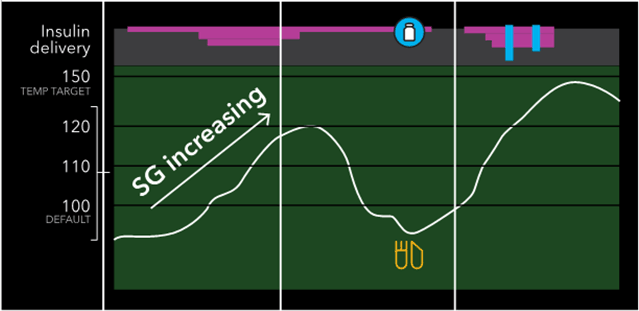
Automatically adjusts your basal (background) insulin delivery every 5 minutes based on your sensor glucose readings and your selected SmartGuard™ target (100, 110, or 120 mg/dL). The SmartGuard target defaults to 100 mg/dL.
Auto corrections
Delivers correction doses of insulin every 5 minutes, as needed, when auto basal insulin has reached it's maximum amount and the sensor glucose rises above 120 mg/dL.
Meal Detection
If you forget a meal bolus† and your glucose rises, SmartGuard™ can sense this and automatically deliver correction insulin to help bring you back to target.
Safe Meal Bolus
Reviews each meal bolus and predicts whether it could cause hypoglycemia over the next 4 hours. If so, it slightly reduces the dose. This feature considers glucose trends, current level, insulin on board, and carbs entered.

Manual Mode basal rates and Max Basal settings do no impact insulin delivery in the SmartGuard™ feature. Always consult with your HCP when changing basal settings.
Note: A temporary fixed target of 150 mg/dL is available to use any time you may be concerned about lows, such as exercise. To learn how to use and set a temporary target, download the guide.
SmartGuard™ warm-up
The SmartGuard™ feature requires a 48-hour warm-up period before activation. This warm-up period begins at midnight after the pump starts delivering insulin and it does not require sensor use. During the warm-up period, the pump collects and processes data for use by the SmartGuard™ feature.
To turn the SmartGuard feature on or off, visit Setting up the SmartGuard™ feature.
If you updated the software on your existing pump and started a new sensor, there is a 5-hour warm-up period before SmartGuard™ becomes active. During this time no automatic insulin adjustments will occur. Continue entering blood glucose (BG) values into your pump for treatment decisions. Once the warm-up is complete, SmartGuard™ technology will automatically begin adjusting insulin delivery every 5 minutes.
There may be other conditions that need to be met. Check out SmartGuard™ Checklist for guidance on what’s needed to start or continue using the SmartGuard™ feature.
SmartGuard™ bolus feature
A bolus should be delivered before meals or snacks that contain carbohydrates. The SmartGuard™ feature calculates a bolus based on the current BG or SG reading and carbs. See how to deliver a bolus in SmartGuard™.
Forgot to bolus? If you remember within 30 minutes of the meal or snack, deliver a bolus for 50 percent (or half) of the carbohydrates that you ate. If it has been over 30 minutes, deliver a correction bolus, if recommended by the system
When SmartGuard™ needs action: A blue banner appears with required actions and a countdown timer. If no action is taken, the pump exits SmartGuard™ and switches to Manual mode.
After exiting SmartGuard™: The blue shield disappears and the pump uses Manual mode settings. The banner shows how to return to SmartGuard™.
To stay in or return to SmartGuard™: Usually, just enter a BG value. Check the SmartGuard™ Checklist for specific steps.
System support User guides and manuals